> ## Documentation Index
> Fetch the complete documentation index at: https://docs.blinko.space/llms.txt
> Use this file to discover all available pages before exploring further.
# Setting
> Guide to Setting AI
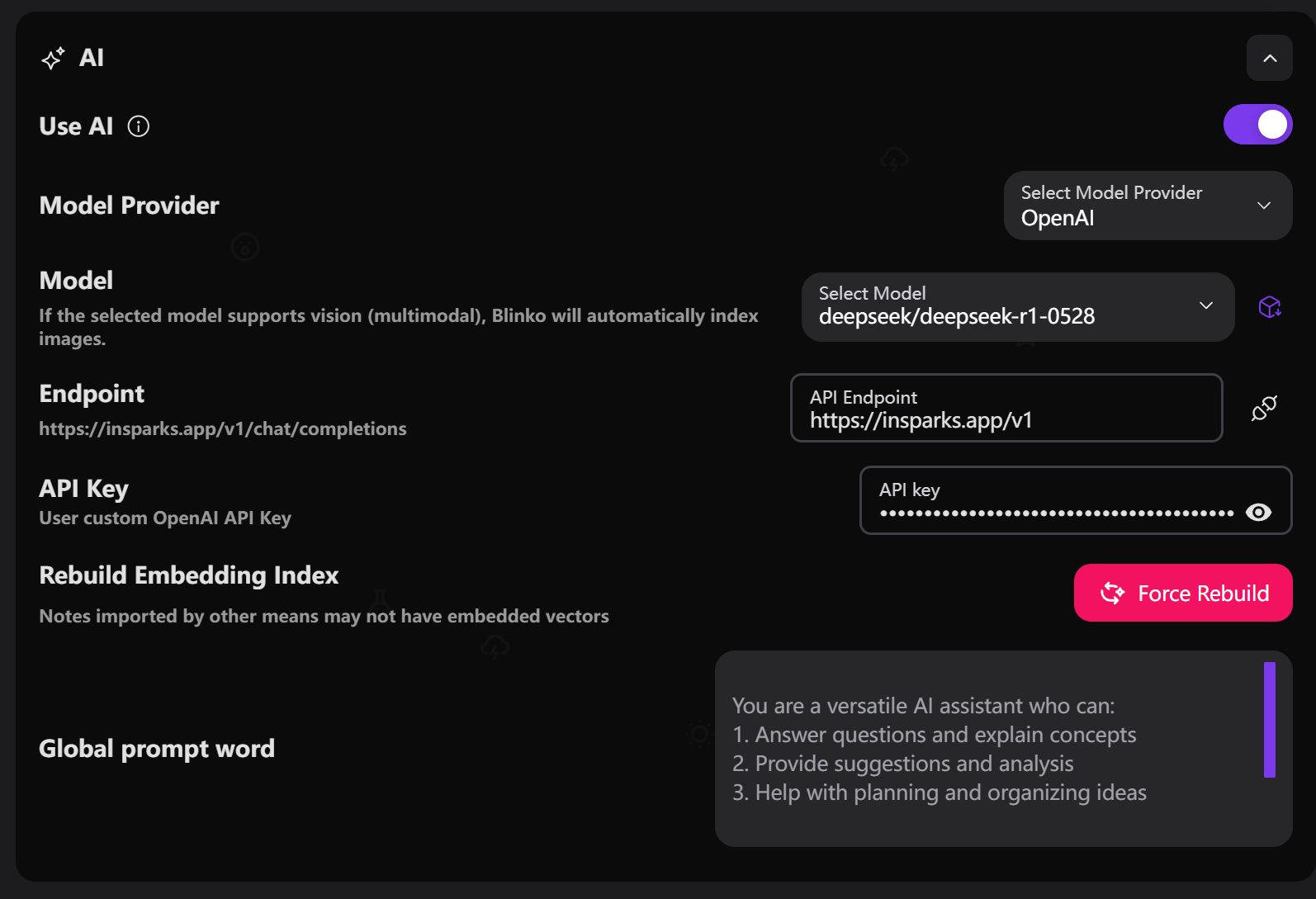 ## Basic Settings
* Locate the "**Use AI**" toggle in settings
* Switch it to the enabled state (purple)
Supported model providers:
* **OpenAI**: Official models and API
* **AzureOpenAI**: Microsoft Azure platform
* **Anthropic**: Claude series models
* **DeepSeek**: DeepSeek series models
* **Gemini**: Google Gemini models
* **Grok**: xAI Grok models
* **Ollama**: Local deployment models
* **OpenRouter**: Multi-model aggregation platform
* Choose corresponding AI model based on provider
* Recommended models:
* OpenAI: gpt-4o, gpt-4o-mini
* Anthropic: claude-3-5-sonnet
* DeepSeek: deepseek-chat
* Enter API key in the "**API Key**" input field
* Ensure key is valid and has necessary permissions
* Different providers require different key formats
* Custom API endpoint address
* Used for proxy or self-deployed services
* Leave empty to use default endpoint
## Embedding Settings
## Basic Settings
* Locate the "**Use AI**" toggle in settings
* Switch it to the enabled state (purple)
Supported model providers:
* **OpenAI**: Official models and API
* **AzureOpenAI**: Microsoft Azure platform
* **Anthropic**: Claude series models
* **DeepSeek**: DeepSeek series models
* **Gemini**: Google Gemini models
* **Grok**: xAI Grok models
* **Ollama**: Local deployment models
* **OpenRouter**: Multi-model aggregation platform
* Choose corresponding AI model based on provider
* Recommended models:
* OpenAI: gpt-4o, gpt-4o-mini
* Anthropic: claude-3-5-sonnet
* DeepSeek: deepseek-chat
* Enter API key in the "**API Key**" input field
* Ensure key is valid and has necessary permissions
* Different providers require different key formats
* Custom API endpoint address
* Used for proxy or self-deployed services
* Leave empty to use default endpoint
## Embedding Settings
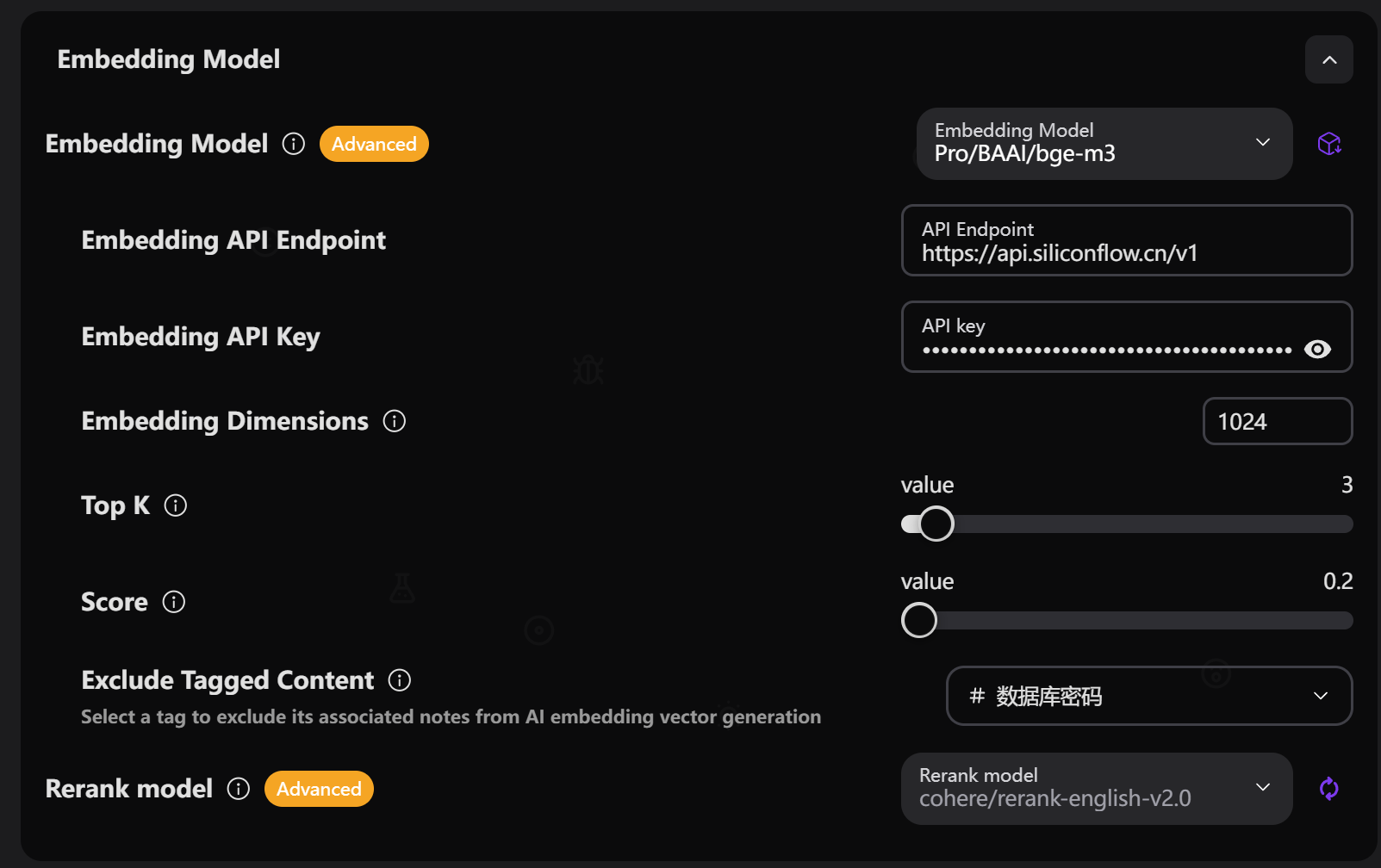 * Select model for generating text embeddings
* Support independent embedding API key and endpoint
* Recommended models:
* OpenAI: text-embedding-3-small, text-embedding-3-large
* Voyage: voyage-3-lite, voyage-large-2
* **Rebuild**: Incremental update of embedding index
* **Force Rebuild**: Complete regeneration of all embeddings
* Index rebuild required after changing embedding model
* Set the dimension size of embedding vectors
* Auto-detect dimensions for common models
* Manual setting required for custom models
## Search Optimization Settings
**\[Search Settings Screenshot Needed]**
* Number of most relevant chunks returned by embedding search
* Range: 1-20 (recommended: 3-5)
* Higher values include more context
* Minimum similarity score threshold for embedding search
* Range: 0.0-1.0 (recommended: 0.4-0.7)
* Higher values ensure more relevant matches
* Use large language model for result reranking
* Improve relevance and accuracy of search results
* **Note**: Currently requires large language models, AI SDK framework doesn't support dedicated rerank models yet
* **Rerank Top K**: Number of results processed by reranking
* **Rerank Score**: Minimum score threshold after reranking
* **Use Embedding Endpoint**: Whether to use independent embedding API endpoint
## Proxy Settings
* Enable HTTP proxy to access AI services
* Configure proxy host, port and authentication
* Suitable for network-restricted environments
## Test Connection
* Click "Test Connection" to verify configuration
* Check validity of API key and endpoint
* Ensure network connection is working
**Important Notes**:
* Rerank model currently requires large language models (like GPT-4)
* Future versions will support dedicated rerank models
* Must rebuild index after changing embedding model
* Select model for generating text embeddings
* Support independent embedding API key and endpoint
* Recommended models:
* OpenAI: text-embedding-3-small, text-embedding-3-large
* Voyage: voyage-3-lite, voyage-large-2
* **Rebuild**: Incremental update of embedding index
* **Force Rebuild**: Complete regeneration of all embeddings
* Index rebuild required after changing embedding model
* Set the dimension size of embedding vectors
* Auto-detect dimensions for common models
* Manual setting required for custom models
## Search Optimization Settings
**\[Search Settings Screenshot Needed]**
* Number of most relevant chunks returned by embedding search
* Range: 1-20 (recommended: 3-5)
* Higher values include more context
* Minimum similarity score threshold for embedding search
* Range: 0.0-1.0 (recommended: 0.4-0.7)
* Higher values ensure more relevant matches
* Use large language model for result reranking
* Improve relevance and accuracy of search results
* **Note**: Currently requires large language models, AI SDK framework doesn't support dedicated rerank models yet
* **Rerank Top K**: Number of results processed by reranking
* **Rerank Score**: Minimum score threshold after reranking
* **Use Embedding Endpoint**: Whether to use independent embedding API endpoint
## Proxy Settings
* Enable HTTP proxy to access AI services
* Configure proxy host, port and authentication
* Suitable for network-restricted environments
## Test Connection
* Click "Test Connection" to verify configuration
* Check validity of API key and endpoint
* Ensure network connection is working
**Important Notes**:
* Rerank model currently requires large language models (like GPT-4)
* Future versions will support dedicated rerank models
* Must rebuild index after changing embedding model