> ## Documentation Index
> Fetch the complete documentation index at: https://docs.blinko.space/llms.txt
> Use this file to discover all available pages before exploring further.
# Toolbar
> Blinko uses markdown to format your notes. Here are the icons and what they do.
 Insert emojis into your text.
Format text as a heading.
Make selected text bold.
Make selected text italic.
Add strikethrough to selected text.
Insert hyperlinks.
Create unordered (bullet) lists.
Create ordered (numbered) lists.
Create to-do lists.
Insert tables.
Insert code snippets.
## Bottom Toolbar
Insert emojis into your text.
Format text as a heading.
Make selected text bold.
Make selected text italic.
Add strikethrough to selected text.
Insert hyperlinks.
Create unordered (bullet) lists.
Create ordered (numbered) lists.
Create to-do lists.
Insert tables.
Insert code snippets.
## Bottom Toolbar
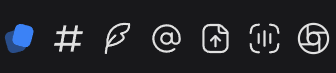 Switch between Blinko and Note modes.
Insert tags to organize your notes.
Get AI assistance with your writing.
Create bidirectional links between notes.
Upload files to your notes.
Record voice notes.
Take photos and add them to your notes.
Switch between Blinko and Note modes.
Insert tags to organize your notes.
Get AI assistance with your writing.
Create bidirectional links between notes.
Upload files to your notes.
Record voice notes.
Take photos and add them to your notes.