> ## Documentation Index
> Fetch the complete documentation index at: https://docs.blinko.space/llms.txt
> Use this file to discover all available pages before exploring further.
# Preference
> Guide to Personal Settings
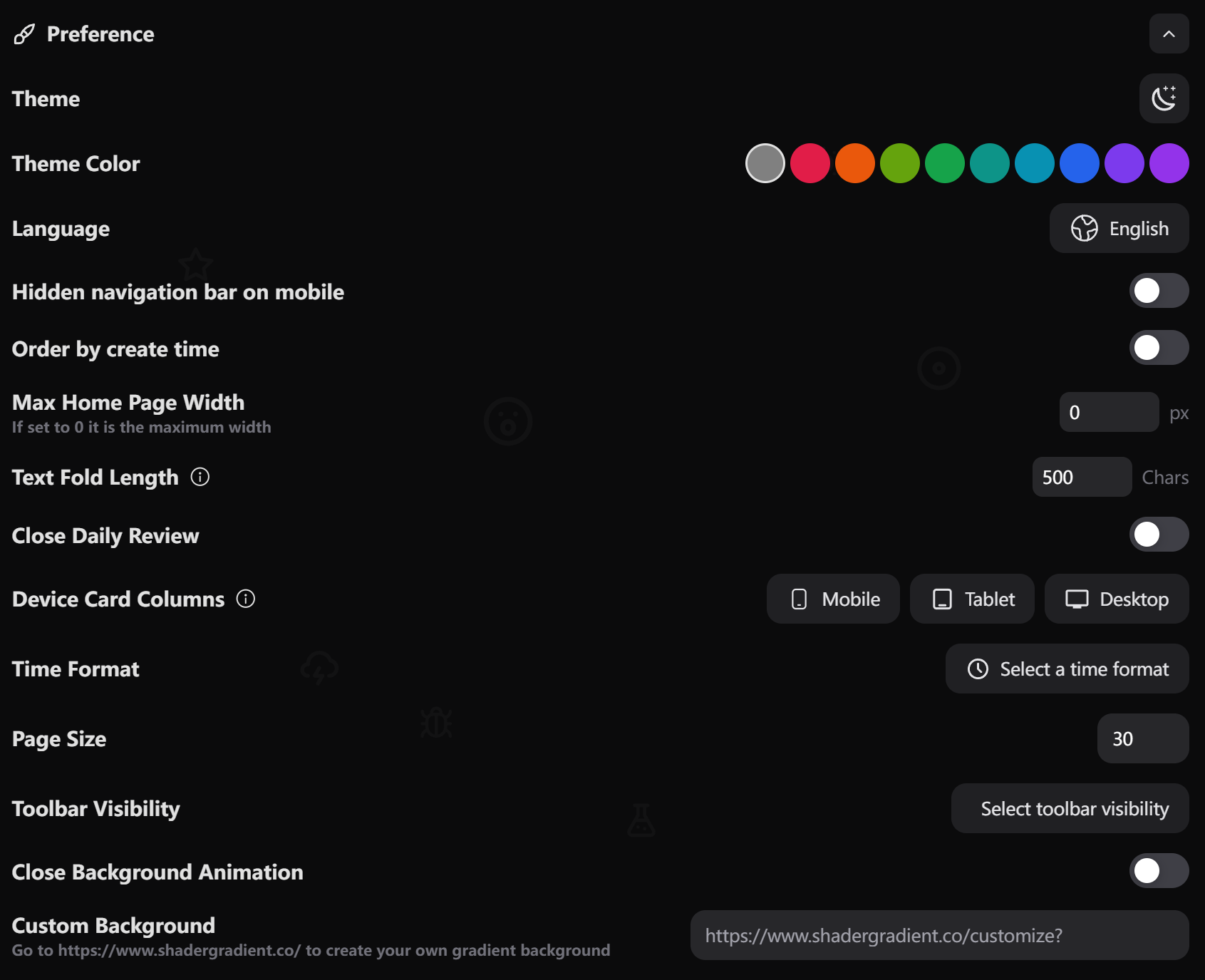 ## Theme Settings
* Choose between Light and Dark themes
* System option follows your device settings
* Toggle using the theme icon in the top right
* Select from a variety of theme colors
* Colors affect UI elements and accents
* Changes apply instantly across the application
## Language Settings
* Select your preferred interface language
* Changes apply immediately across the application
## Mobile Settings
* Toggle navigation bar visibility on mobile devices
* When enabled, navigation bar auto-hides while scrolling
* Improves content viewing experience on smaller screens
## Content Display Settings
* Toggle between creation time and custom ordering
* Affects how items are sorted in lists and galleries
* Enable for chronological organization
* Set maximum character length before text folding
* Default: 500 characters
* Helps manage long content display
* Adjustable based on reading preferences
* Customize grid layout for different screen sizes
* Mobile: 1-2 columns
* Tablet: 2-4 columns
* Desktop: 2-6 columns
* Optimizes viewing experience across devices
* Choose preferred time display format
* Customize date display patterns
* Applies globally across the application
* Set maximum width for the home page layout
* Enter 0 for maximum available width
* Helps optimize content display for different screen sizes
* Set the number of items displayed per page
* Default: 30 items
* Customize based on your browsing preferences
* Customize which toolbar elements are visible
* Toggle specific tools on/off
* Personalize your editing experience
## Animation Settings
* Toggle background animation effects
* Enable/disable for performance optimization
* Affects overall UI smoothness
## Custom Background
* Create your own gradient background (Login Page & Share Page)
* Visit [https://www.shadergradient.co/](https://www.shadergradient.co/) for customization
* Apply personalized background styles
Changes to these settings are saved automatically and take effect immediately.
Some settings may require a page refresh to fully apply the changes.
## Theme Settings
* Choose between Light and Dark themes
* System option follows your device settings
* Toggle using the theme icon in the top right
* Select from a variety of theme colors
* Colors affect UI elements and accents
* Changes apply instantly across the application
## Language Settings
* Select your preferred interface language
* Changes apply immediately across the application
## Mobile Settings
* Toggle navigation bar visibility on mobile devices
* When enabled, navigation bar auto-hides while scrolling
* Improves content viewing experience on smaller screens
## Content Display Settings
* Toggle between creation time and custom ordering
* Affects how items are sorted in lists and galleries
* Enable for chronological organization
* Set maximum character length before text folding
* Default: 500 characters
* Helps manage long content display
* Adjustable based on reading preferences
* Customize grid layout for different screen sizes
* Mobile: 1-2 columns
* Tablet: 2-4 columns
* Desktop: 2-6 columns
* Optimizes viewing experience across devices
* Choose preferred time display format
* Customize date display patterns
* Applies globally across the application
* Set maximum width for the home page layout
* Enter 0 for maximum available width
* Helps optimize content display for different screen sizes
* Set the number of items displayed per page
* Default: 30 items
* Customize based on your browsing preferences
* Customize which toolbar elements are visible
* Toggle specific tools on/off
* Personalize your editing experience
## Animation Settings
* Toggle background animation effects
* Enable/disable for performance optimization
* Affects overall UI smoothness
## Custom Background
* Create your own gradient background (Login Page & Share Page)
* Visit [https://www.shadergradient.co/](https://www.shadergradient.co/) for customization
* Apply personalized background styles
Changes to these settings are saved automatically and take effect immediately.
Some settings may require a page refresh to fully apply the changes.