> ## Documentation Index
> Fetch the complete documentation index at: https://docs.blinko.space/llms.txt
> Use this file to discover all available pages before exploring further.
# Blinko插件
> Blinko插件扩展了您的笔记体验功能。本指南将帮助您发现、安装和管理插件。
### 插件市场
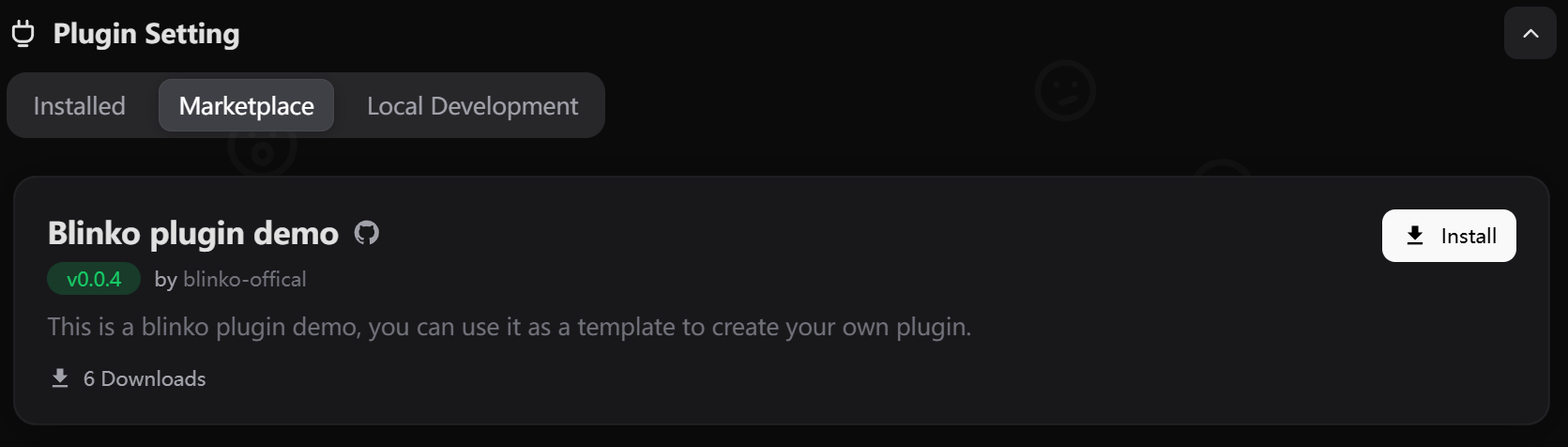 1. 打开Blinko并进入设置
2. 点击"插件设置"
3. 浏览市场中可用的插件
4. 点击插件查看其详细信息,包括:
* 描述
* 作者
* 版本
* 文档
## 安装插件
1. 找到您想安装的插件
2. 点击"安装"按钮
3. 查看插件请求的权限
4. 点击"确认"进行安装
## 管理插件
### 插件设置
1. 打开Blinko并进入设置
2. 点击"插件设置"
3. 浏览市场中可用的插件
4. 点击插件查看其详细信息,包括:
* 描述
* 作者
* 版本
* 文档
## 安装插件
1. 找到您想安装的插件
2. 点击"安装"按钮
3. 查看插件请求的权限
4. 点击"确认"进行安装
## 管理插件
### 插件设置
 大多数插件提供自定义选项:
1. 进入设置 > 插件设置
2. 找到已安装的插件
3. 点击设置图标(⚙️)
4. 调整可用选项
5. 保存您的更改
### 移除插件
如果您需要禁用或移除插件:
1. 进入设置 > 插件设置
2. 找到您想管理的插件
3. 或点击"卸载"按钮进行移除
## 开发
有兴趣创建您自己的插件?
* 查看我们的[插件开发指南](/zh/plugins/get-started)
* 加入我们的[开发者社区](/zh/community/community)
* 浏览[API参考](/zh/plugins/api-reference)
大多数插件提供自定义选项:
1. 进入设置 > 插件设置
2. 找到已安装的插件
3. 点击设置图标(⚙️)
4. 调整可用选项
5. 保存您的更改
### 移除插件
如果您需要禁用或移除插件:
1. 进入设置 > 插件设置
2. 找到您想管理的插件
3. 或点击"卸载"按钮进行移除
## 开发
有兴趣创建您自己的插件?
* 查看我们的[插件开发指南](/zh/plugins/get-started)
* 加入我们的[开发者社区](/zh/community/community)
* 浏览[API参考](/zh/plugins/api-reference)